May Enhancements
Welcome to the May 2026 edition of our release notes! This section describes the enhancements included in the Communication Hub release for May, 2026.
Enhancement to Recipient's Filter
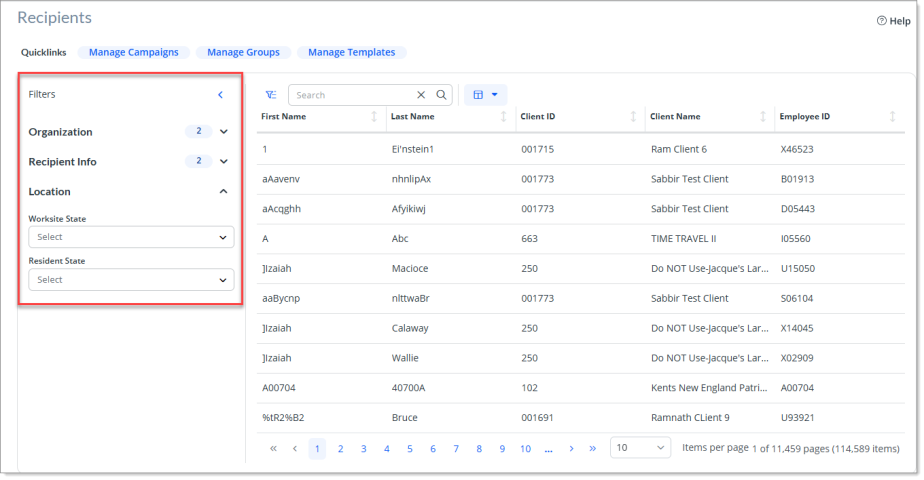
The filter on the Recipient screen now groups filters into the following three collapsible sections:
-
Organization
-
Recipient Info
-
Location
-
The Organization section is expanded by default, while Recipient Info and Location are collapsed.
-
Each section header displays a count of active filters, which the system updates in real time as you make selections.
JIRA # COMM-2544
New Preferred Text Number Field
A new attribute field, Preferred Text Number, is now available in Communication Hub. This new attribute allows you to view the recipient's saved SMS phone number and manage the phone number used for SMS communications.
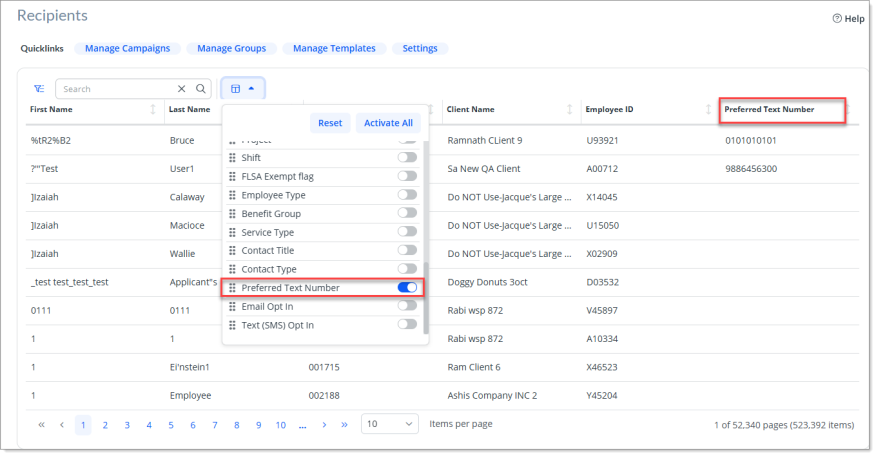
For more information, see Viewing Recipients.
JIRA # COMM-2787
Enhancement to Date Pickers
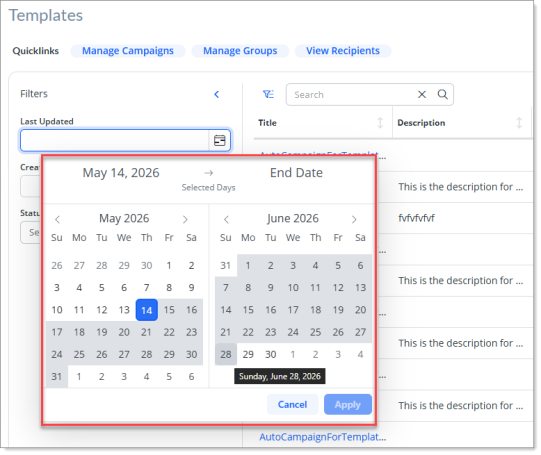
The earlier date picker in the filters section has now been replaced with the same date picker with a date range across dashboards, wherever applicable. This enhancement provides a consistent filtering experience across all Communication Hub dashboards.
JIRA # COMM-2129
Enhancement to Campaigns Dashboard
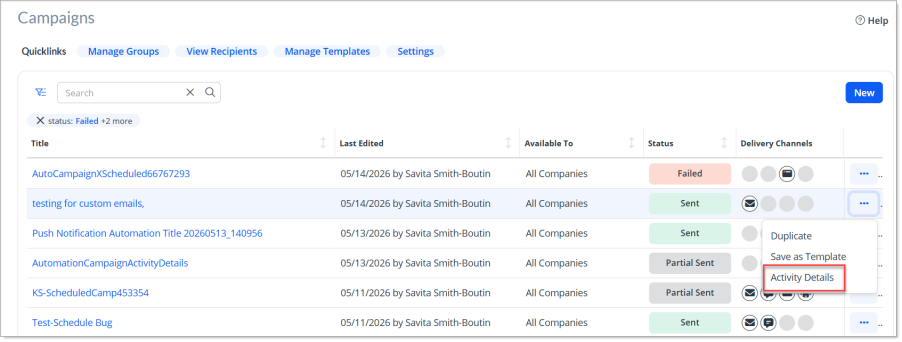
A new action menu option, Activity Details, is now added on the Campaigns Dashboard screen that allows you to quickly navigate to the campaign's activity details modal window and troubleshoot any delivery outcomes.
-
The Activity Details now displays in a modal window instead of a separate page.
-
The Activity Details option is available only for Sent, Partial Sent, and Failed campaigns.
-
Clicking the Activity Details option displays the Activity Details modal window for the selected campaign.
JIRA # COMM-2851
Enhancement to Error Message for Failed Text Messages
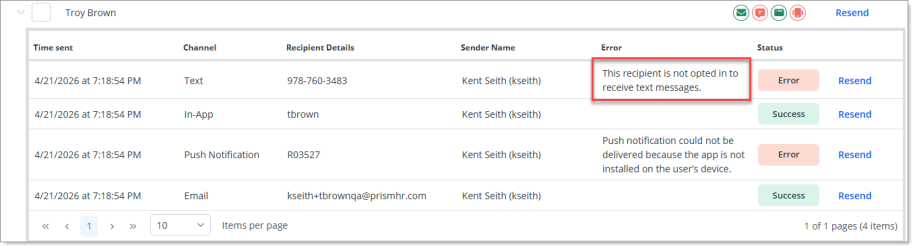
While viewing the Activity Details for Failed Text messages, the system that displayed the error message when a recipient does not opt in to receive text messages has now been changed. The system now displays, "This recipient is not opted in to receive text messages." This enhancement allows you to clearly know when you have not opted in to receive text messages so that you can better understand why the text message delivery failed.
JIRA # COMM-2830
Enhancement to Error Message for Failed Push Notifications
While viewing the Activity Details for Failed Push Notification delivery method, the error message that the system has now been enhanced to provide accurate and specific failure messages.
Now, the system display the following error messages for different scenarios:
-
If a recipient has never installed or logged into the PrismHR Mobile App on any device, the system displays the error message stating, “Push notification could not be delivered because the app is not installed on the user’s device.”
-
If a recipient has installed and logged into the app but has disabled push notifications within the app settings, then the system displays the error message stating, “Push notifications are disabled for this user.”
-
If a recipient is using an older version of the PrismHR Mobile App that does not support Push Notifications, then the system displays the error message stating, ”Push notification could not be delivered because the recipient is using an outdated version of the app.”
JIRA # COMM-2341
New Settings Dashboard
A new dashboard named Settings has been introduced that allow clients to manage list of approved From and Reply To email addresses, which allows the campaigns to use consistent and approved sender information.
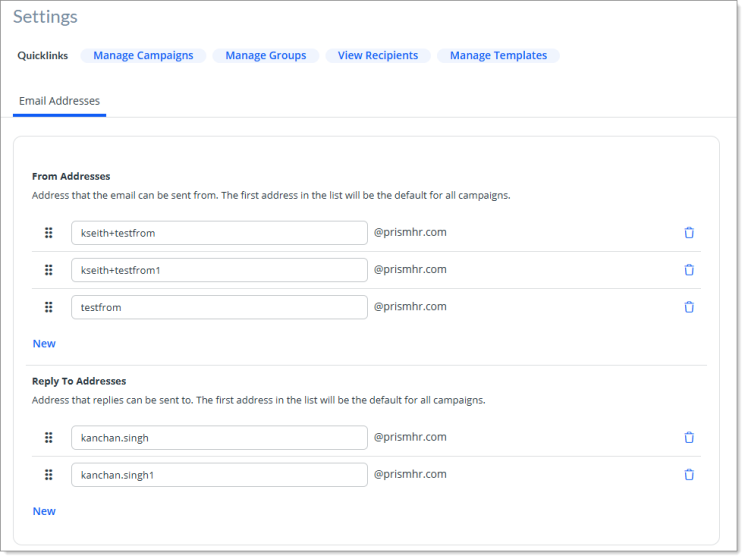
You can access this dashboard by clicking the Settings quicklink from any of the other dashboards.
The dashboard displays the following sections under the Email Addresses tab:
-
From Addresses
-
Reply To Addresses
Please note the following:
-
You can only view the From Address or Reply To Address if you have previously set up a custom domain through PrismHR support.
-
Click New in either of the sections to add new entry for From or Reply To Addresses.
-
You can delete an email address record simply by clicking the delete icon.
-
Simply drag a record to reorder the From or Reply To email addresses.
-
The domain part of the email address is in read‑only format and is consistent across all entries.
-
In order to use the customized Reply To and/or From emails while creating a campaign, a new optional field, Custom From & Reply To Address is now available that allows you to optionally select Custom From and Reply To addresses so that recipients see the most appropriate sender and reply destination.
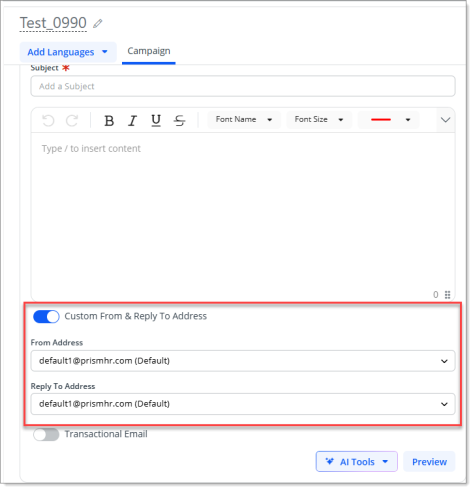
Note: If the custom domain (@domain.com) is not configured, then the system displays a message, The From and Reply To email domains have not been configured for your account. Please contact your administrator to complete the setup.
JIRA # COMM-2924, COMM-2925
